How to Build a Visual Reference Library Before Your Shoot
Most filmmakers collect references. Screenshots from films they've watched, stills saved from Instagram, frames grabbed from a YouTube essay about some DP's lighting approach. The folder exists. Usually it's called something like "INSPO" or "REF" and it sits on the desktop accumulating images until it becomes useless.

Having a collection isn't the same as having a system. And on a shooting day, a disorganized reference library is worse than no library at all — because you'll waste time looking for the thing you know you saved, and that time comes out of the budget, the schedule, or the shot.
Here's how to build a visual reference library that actually works before you call action.
A Reference Library Is Not a Mood Board
This distinction matters more than most people acknowledge.
A mood board is a deliverable. You build it for a director's treatment, for a client presentation, for the production designer and costume department. It's curated — usually 15 to 30 frames — annotated, polished, and edited down to only the frames that communicate the project's visual direction. It's what you show other people.
A reference library is your working tool. It's not for presentation. It's for decision-making. It can be sprawling, messy, and contain images that wouldn't make sense to anyone but you — because it's organized around the questions you'll need to answer, not around how it looks in a pitch deck.
Lawrence Sher, ASC — the DP behind Joker and The Hangover trilogy, and the founder of ShotDeck — started his reference system as a personal Lightroom catalog years before ShotDeck was ever a product. The point wasn't to build something shareable. The point was to be able to find exactly the lighting approach he needed, fast, when he needed it.
That's the mindset shift. A reference library is infrastructure, not presentation.
What Goes In (And What Doesn't)
The default behavior is to save anything that looks good. That's how you end up with 4,000 images and no way to find the one you actually need.
A stricter test: does this reference answer a specific question you'll face on set or in a prep meeting?
Good categories to build out:
- Lighting setups — not "moody lighting" in the abstract, but specific approaches: motivated practicals, hard direct sunlight through a window, fluorescent mixed with tungsten, night exteriors with minimal fill. Organized by what they solve.
- Camera movement — if you're planning a particular move (a slow push in during dialogue, a handheld chase), save frames or clips from films that handled a similar move the way you want to handle it.
- Color palette by scene — not for the whole film, but per scene or sequence. INT NIGHT APARTMENT might have different references than EXT DAY ROOFTOP.
- Composition — specific framings you're working toward for key shots. How much headroom, where the eyeline sits, whether the frame feels closed or open.
- Texture and production design — the stuff that's not strictly cinematography but affects every visual decision: materials, surfaces, how light interacts with the environment.
What to leave out: images saved because they're beautiful, because you liked the film, or because they vaguely match some feeling you have about the project. If you can't articulate what question this reference answers, it doesn't belong in a working library. Put it in the mood board if it belongs anywhere.
How to Organize It So It's Actually Useful
Organizing by film title is the least useful approach. Film-based organization tells you where something came from, not what it solves.
Organize by scene or sequence first, then by visual problem within each scene. A folder structure might look like:
SCENE 03 — INT. BAR (NIGHT)
  → lighting — neon practical reference
  → lighting — deep shadow fill
  → camera — low angle coverage
  → color — desaturated warm

SCENE 07 — EXT. STREET (MAGIC HOUR)
  → lighting — backlight/rim reference
  → camera movement — tracking alongside character
This sounds obvious until you're three weeks into pre-production, the DP is asking about a specific setup for scene 7, and you can pull up exactly what you had in mind instead of saying "I saw something somewhere..."
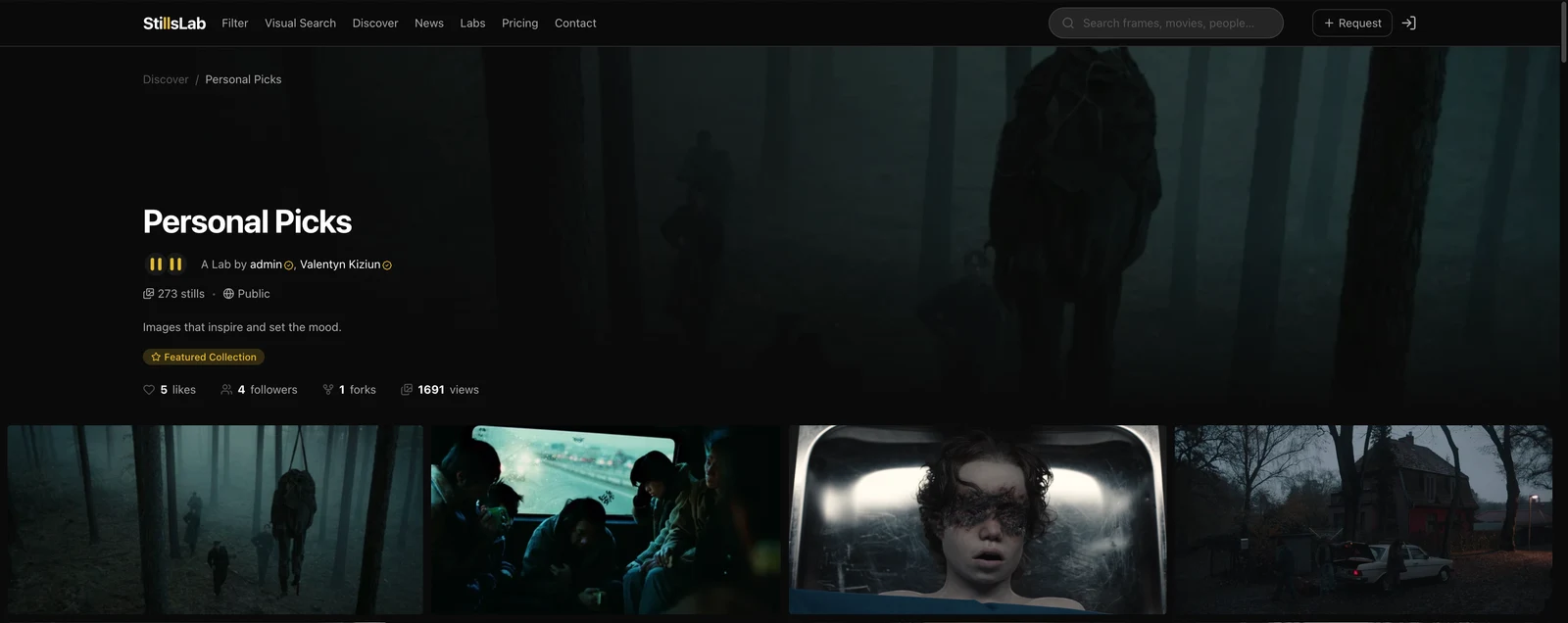
The folder approach works, but it breaks down the moment you need to share. What's intuitive to you at 2am might not translate when you're reviewing it with your crew in a prep meeting. Named collections — what StillsLab calls Labs — solve this more cleanly: you create a Lab per scene or visual problem, populate it with stills pulled from the image database or uploaded from your own sources, and share it with your DP or director as a structured reference set rather than a dump of files. Everyone is looking at the same thing, organized the same way.
The Moment References Connect to Your Shot List
This is where most workflows break down. References live in a folder. The shot list lives in a spreadsheet. They don't talk to each other. On set, they're consulted separately — which means the reference that was supposed to inform shot 14B either gets forgotten or requires someone to pull it up on their phone while the crew waits.
The more functional workflow: references should be linked directly to shots. When you're looking at shot 14B in your shot list, the reference for that shot's lighting, composition, or movement is right there alongside it. Not in a separate folder you have to remember to check. Not on a different screen. There.
This isn't just a convenience improvement. It changes how you build the shot list. Instead of writing notes like "warm, naturalistic, like A Beautiful Mind" in a comments field and hoping your DP translates that the same way, you're pinning a specific frame. The communication becomes visual, not interpretive.
In practice, this means being able to attach a still to a shot directly from a collection you've already curated — or searching a film image database and pinning a result right into the shot without leaving the tool. The reference doesn't live somewhere else anymore. It lives with the shot it belongs to.
Pre-production is full of decisions that feel abstract until you're standing on a location with a camera. A reference library tied to your shot list collapses that gap.
StillsLab is being built around exactly this workflow. You create Labs — named collections of film stills — organized however your pre-production logic demands. Then you build your shot list and attach references directly from your Labs, or search the image database and pin frames straight to individual shots. Everything in one place, connected from first prep to shooting day. We're opening early access soon. Join the waitlist →
How did you like this article?
Login to react to this article
Discussion (0)
💬 No comments yet. Be the first to share your thoughts!